library(tidyverse)

country_wide <- read_csv("data/gpfg_country_wide.csv")
country_lookup <- read_csv("data/gpfg_country_lookup.csv")9 Join and Reshape
Part 5: Advanced Workflows
The earlier chapters used one long table: each row was a holding in one year. Real reporting projects often arrive as several tables, or in a layout made for reading rather than analysis. This chapter introduces two ways to prepare those data: reshape columns into rows and join related tables.
9.1 Learning objectives
By the end of this chapter, you should be able to:
- distinguish long data from wide data;
- use
pivot_longer()to turn year columns into observations; - identify a suitable key shared by two tables;
- use
anti_join()to find unmatched keys; - use
left_join()to add variables from a lookup table; and - use
pivot_wider()when a reporting output needs separate columns.
9.2 Begin with a reporting need
Suppose a colleague sends two files:
gpfg_country_wide.csvcontains one row per country and a separate column for each year;gpfg_country_lookup.csvconnects each country to a region.
We want to answer:
How did the total reported market value of NBIM’s equity holdings change by region from 2021 through 2025?
Neither file can answer the question alone. The values must first be reshaped so that year is a variable, and then the region labels must be added from the second table.
Continue in the same project
Open djr.Rproj and create 09-join-reshape.Rmd. Download gpfg_country_wide.csv and gpfg_country_lookup.csv, then save both in data/.
Inspect the two files before changing them:
glimpse(country_wide)Rows: 70
Columns: 6
$ country <chr> "Australia", "Austria", "Bahrain", "Bangladesh", "Belgium", "B…
$ `2021` <dbl> 169158412726, 14307436729, 657446322, 1868576845, 47092405603,…
$ `2022` <dbl> 198502533260, 10571278484, 986824981, 1527301357, 43348203395,…
$ `2023` <dbl> 225499465333, 13908542138, 290817612, 1529050578, 54782498477,…
$ `2024` <dbl> 237704731335, 12034559582, NA, 1612038467, 51615968758, 545524…
$ `2025` <dbl> 240051964741, 17254681590, NA, 1181396167, 60100344168, 571698…glimpse(country_lookup)Rows: 70
Columns: 2
$ country <chr> "Australia", "Austria", "Bahrain", "Bangladesh", "Belgium", "B…
$ region <chr> "Oceania", "Europe", "Middle East", "Asia", "Europe", "Latin A…The first table contains the values, but its years are column names. The second contains region, but no annual values. Both contain country, which can connect them.
9.3 Wide and long data
In the wide table, one row represents one country and each year has its own column:
| country | 2021 | 2022 | 2023 | 2024 | 2025 |
|---|---|---|---|---|---|
| Australia | … | … | … | … | … |
For analysis and visualization, we usually want one observation per row. A long table stores the year in one column and its value in another:
| country | year | market_value_nok |
|---|---|---|
| Australia | 2021 | … |
| Australia | 2022 | … |
The long layout makes year available for filter(), group_by(), and the x-axis of a chart. It also avoids writing separate code for every annual column.
9.4 Convert wide data to long data
Watch how the animation moves column names and values into a long table, then reverses the process with pivot_wider(). The id column identifies each observation. In our example, country plays that role, the year column names become year, and the numbers become market_value_nok.
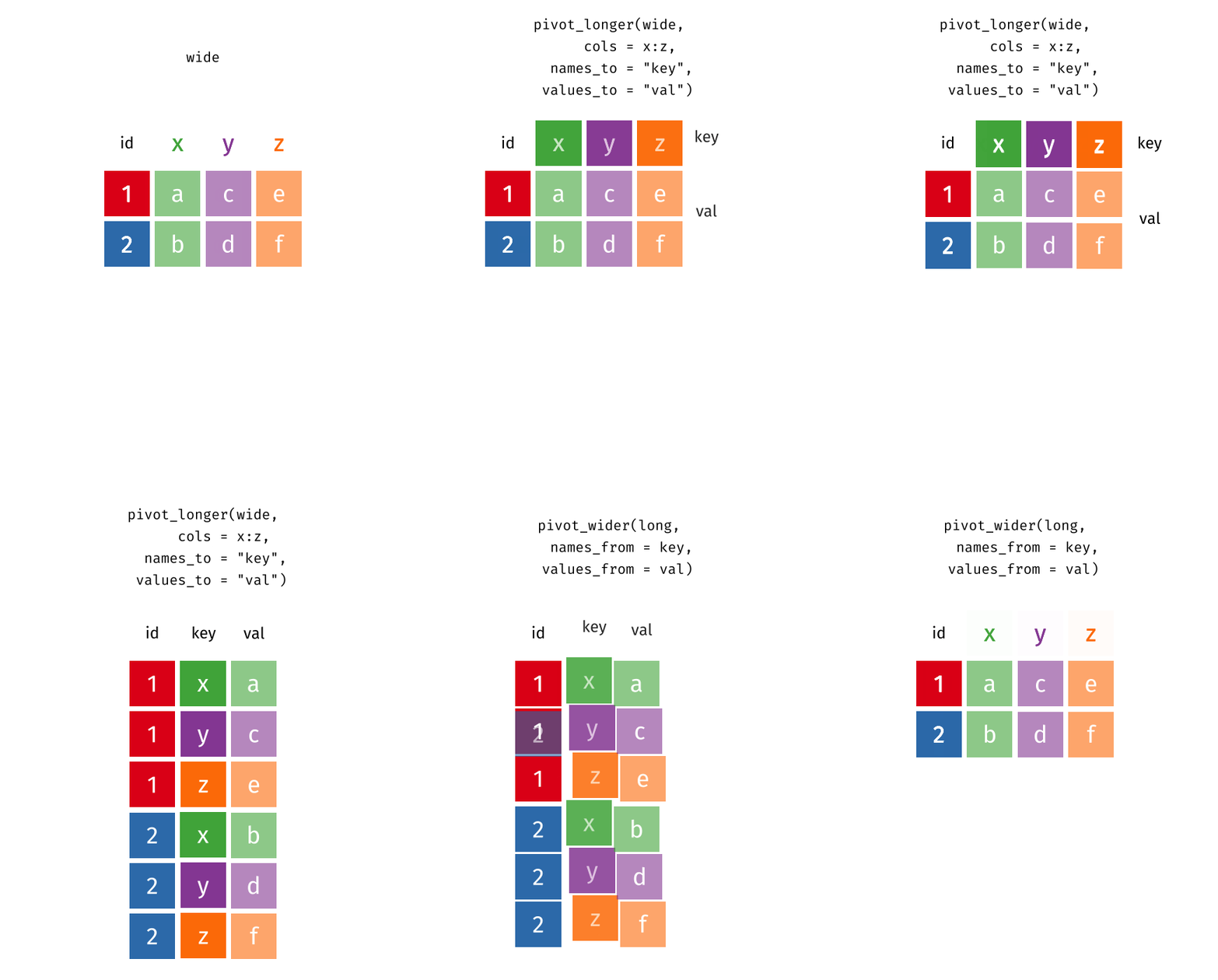
Animation source: tidyexplain.
pivot_longer() needs three pieces of information:
cols: the columns to move into rows;names_to: the name of the new column that will store the old column names; andvalues_to: the name of the new column that will store their values.
Here, every column except country is a year column:
country_year <- country_wide |>
  pivot_longer(
    cols = -country,
    names_to = "year",
    values_to = "market_value_nok"
  )

country_year
cols = -country means “reshape every column except country.” The old column names become values of year.
Correct the new year type
Column names are text, so year is now a character column even though its values look like numbers. parse_integer() reads whole-number text such as "2021" as an integer. Use it after reshaping:
country_year <- country_year |>
  mutate(year = parse_integer(year))

glimpse(country_year)
Rows: 350
Columns: 3
$ country <chr> "Australia", "Australia", "Australia", "Australia", "…
$ year <int> 2021, 2022, 2023, 2024, 2025, 2021, 2022, 2023, 2024,…
$ market_value_nok <dbl> 169158412726, 198502533260, 225499465333, 23770473133…We use this conversion because the year values came from column names. This is a useful example of a cleaning step being prompted by a real change in the data.
Check the new structure:
country_year |>
  count(year)
One row now represents one country in one year. Count empty values as well:
country_year |>
  group_by(year) |>
  summarise(missing_values = sum(is.na(market_value_nok)))
A missing value means the wide source had an empty cell for that country-year combination. It does not mean the fund reported a value of zero.
9.5 Join variables from another table
The long table still has no region. A join matches rows across tables by a shared column called a key. Here, country is the proposed key.
Before joining, check that every country appears only once in the lookup table:
country_lookup |>
  count(country) |>
  filter(n > 1)
An empty result means there are no duplicate country keys. If a country appeared twice, joining it could unexpectedly create extra rows.
Next, find source countries that have no match in the lookup table:
country_year |>
  distinct(country) |>
  anti_join(country_lookup, by = "country")
anti_join() keeps keys from the left table that are absent from the right. An empty result means every country found a match. This is a useful check, not the final combined table.
Now add region. The basic form is left_table |> left_join(right_table, by = "key"). It keeps every row from the left table and adds matching columns from the right table:
In the animation, id is the matching key. Watch the row with id = 3: it stays in the result even though the right table has no match, so its new value is NA. The right-only row with id = 4 is not added. In our example, country is the key, country_year is the left table, and country_lookup supplies the new region column.
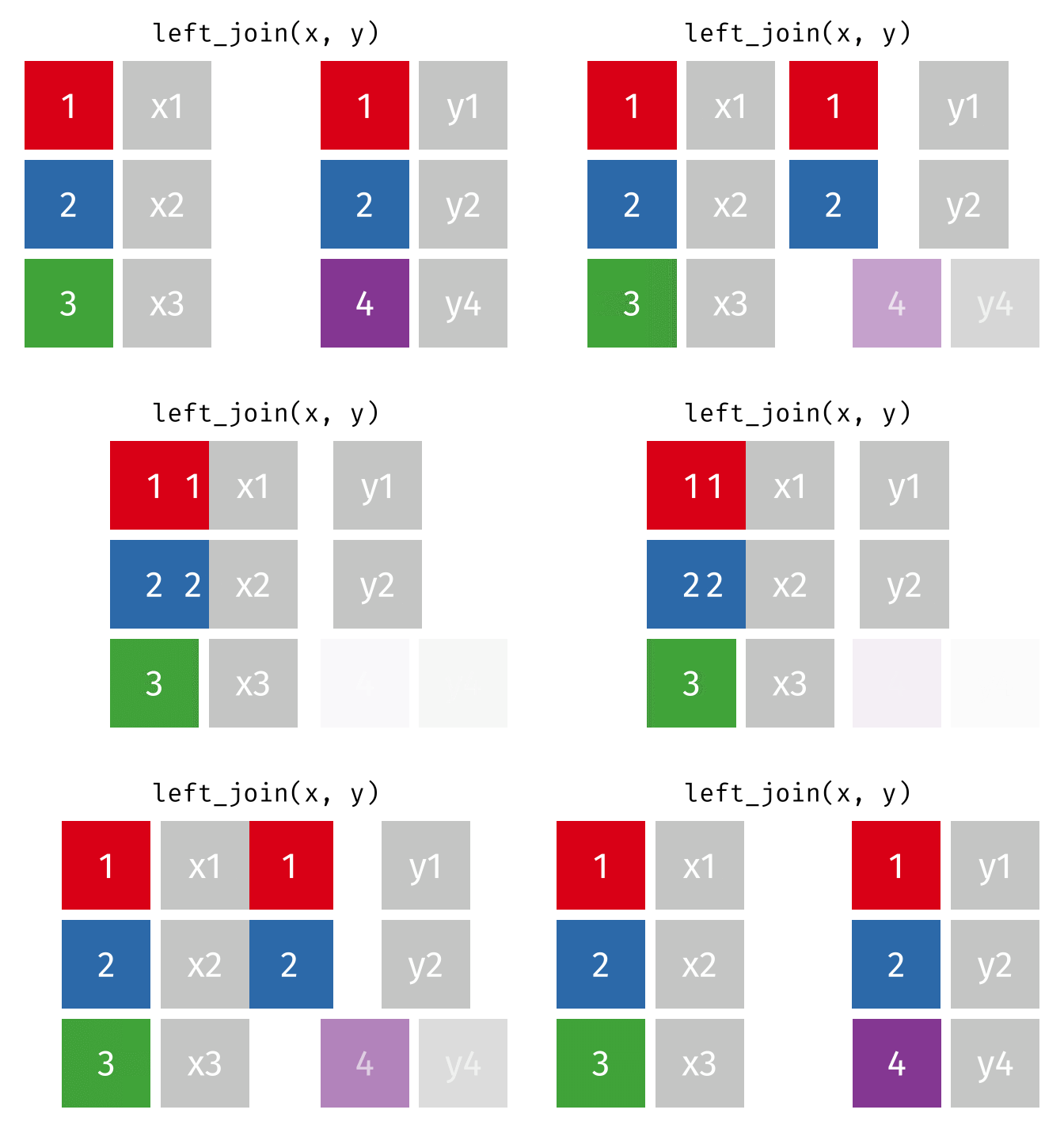
Animation source: tidyexplain.
Now apply the same operation to our country tables:
country_year <- country_year |>
  left_join(country_lookup, by = "country")

glimpse(country_year)
Rows: 350
Columns: 4
$ country <chr> "Australia", "Australia", "Australia", "Australia", "…
$ year <int> 2021, 2022, 2023, 2024, 2025, 2021, 2022, 2023, 2024,…
$ market_value_nok <dbl> 169158412726, 198502533260, 225499465333, 23770473133…
$ region <chr> "Oceania", "Oceania", "Oceania", "Oceania", "Oceania"…Here the essential by argument states that country is the column that should match.
Always check the row meaning after a join
Before the join, one row represented one country-year. That should still be true afterward. Duplicate keys in the lookup table can multiply rows and inflate later totals.
9.6 Answer the question
Now the combined table contains all three columns needed for the question: year, region, and market_value_nok. The earlier check found some unavailable country-year values, so na.rm = TRUE tells sum() to ignore those NA values when calculating each reported total:
region_year <- country_year |>
  group_by(year, region) |>
  summarise(market_value_nok = sum(market_value_nok, na.rm = TRUE)) |>
  arrange(year, desc(market_value_nok))

region_year
The result has one row per region and year. It can now be used for a comparison table or a multi-line chart. Notice the workflow: the reporting question told us which variables were missing and therefore which reshape and join were necessary. Ignoring NA during the calculation does not replace those cells with known zeros.
9.7 When would we make data wider?
Long data are usually easier to analyse in R. Wide data can still be helpful for a compact reporting table—for example, one row per country with 2024 and 2025 values side by side.
Revisit Figure 9.1 and follow the pivot_wider() direction. This time, values in the year column become column names, while each country’s market_value_nok values fill the cells.
country_change <- country_year |>
  filter(year %in% c(2024, 2025)) |>
  select(country, year, market_value_nok) |>
  pivot_wider(
    names_from = year,
    values_from = market_value_nok
  )

country_change
pivot_wider() uses values from year as new column names and values from market_value_nok to fill those columns. Use this layout when the output calls for it; keep the long version for most analysis and charts.
9.8 Choose the operation by the problem
| Situation | Function |
|---|---|
| Same columns, different observations | bind_rows() |
| Variables spread across repeated columns | pivot_longer() |
| Add variables by matching a key | left_join() |
| Find keys that did not match | anti_join() |
| Put category values into separate columns | pivot_wider() |
Chapter 6 used bind_rows() because the annual files had the same columns and needed to be stacked. This chapter uses left_join() because two tables hold different variables about the same countries.
9.9 Practice
- Import the wide and lookup files and explain what one row represents in each.
- Reshape the annual columns into
yearandmarket_value_nok. - Confirm that
yearhas the correct type. - Check duplicate and unmatched country keys before joining.
- Join the region labels and calculate one annual total per region.
- Write one sentence explaining why the reshape and join were necessary.
9.10 Takeaways
| Function | What it does |
|---|---|
pivot_longer() |
Moves repeated columns into name and value columns |
parse_integer() |
Reads whole numbers stored as text |
count() |
Checks how often each key or category appears |
anti_join() |
Finds keys from the left table without a match |
left_join() |
Keeps the left table and adds matching columns |
pivot_wider() |
Moves category values into separate columns |
In Chapter 10, we will use the same join logic to connect investment-market summaries to geographic boundary coordinates.
Want more control?
The tidyr pivoting guide shows more reshaping patterns. The dplyr joins guide explains additional joins. Begin with pivot_longer(), left_join(), and anti_join(); use another operation only when the reporting task requires it.