14  Paris 2024 Olympics

14.1 Data Import

library(tidyverse)
df <- read_csv("data/medallists.csv")
colnames(df)
 [1] "medal_date"   "medal_type"   "medal_code"   "name"         "gender"      
 [6] "country_code" "country"      "country_long" "nationality"  "team"        
[11] "team_gender"  "discipline"   "event"        "event_type"   "url_event"   
[16] "birth_date"   "code_athlete" "code_team"   

14.2 Data Clean

df_clean <- df |>
  select(name, gender, country, medal_type, birth_date, discipline, event, code_athlete, country_code)

glimpse(df_clean)
Rows: 2,315
Columns: 9
$ name         <chr> "EVENEPOEL Remco", "GANNA Filippo", "van AERT Wout", "BRO…
$ gender       <chr> "Male", "Male", "Male", "Female", "Female", "Female", "Ma…
$ country      <chr> "Belgium", "Italy", "Belgium", "Australia", "Great Britai…
$ medal_type   <chr> "Gold Medal", "Silver Medal", "Bronze Medal", "Gold Medal…
$ birth_date   <date> 2000-01-25, 1996-07-25, 1994-09-15, 1992-07-07, 1998-11-…
$ discipline   <chr> "Cycling Road", "Cycling Road", "Cycling Road", "Cycling …
$ event        <chr> "Men's Individual Time Trial", "Men's Individual Time Tri…
$ code_athlete <dbl> 1903136, 1923520, 1903147, 1940173, 1912525, 1955079, 192…
$ country_code <chr> "BEL", "ITA", "BEL", "AUS", "GBR", "USA", "KOR", "TUN", "…

14.3 Data Analysis

  • Q1: Who won the most medals in Paris 2024?
  • Q2: Who won the most gold medals in Paris 2024?
  • Q3: Which country has the most medallists in Paris 2024?

Q1: Who won the most medals in Paris 2024?

df_clean |>
  group_by(name) |>
  summarise(medal_count = n()) |>
  arrange(desc(medal_count)) |>
  head(10)

Q2: Who won the most gold medals in Paris 2024?

df_clean |>
  filter(medal_type == "Gold Medal") |>
  group_by(name) |>
  summarise(gold_count = n()) |>
  arrange(desc(gold_count)) |>
  head(10)

Q3: Which country has the most medallists in Paris 2024?

df_clean |>
  group_by(country) |>
  summarise(medallist_count = n()) |>
  arrange(desc(medallist_count)) |>
  head(10)

14.4 Visualization

Bar Chart

We will use a bar chart to show top 20 country with most medallists in Paris 2024.

df_clean |>
  group_by(country) |>
  summarise(medallist_count = n()) |>
  arrange(desc(medallist_count)) |>
  head(20) |>
1  ggplot(aes(x = reorder(country, medallist_count), y = medallist_count)) +
2  geom_col() +
3  coord_flip() +
  labs(title = "Top 20 Countries with Most Medallists in Paris 2024",
       x = "Country",
       y = "Number of Medallists") +
  theme_minimal() 
1
Use reorder() to reorder countries based on the number of medallists.
2
Use geom_col() to create a bar chart.
3
Use coord_flip() to flip the x and y axes because we want to show the countries on the y-axis for better readability.

Note

Why do we need to “reorder()” even if we have already used “arrange()”? 1. arrange(): This function reorders the rows of the data frame based on a variable, but it doesn’t change the internal ordering of factor levels in R. Factor levels determine how categorical variables (like country) are displayed on the plot’s axes. 2. reorder(): In the aes() function of ggplot(), reorder(country, medallist_count) specifically reorders the factor levels of country based on the values of medallist_count. This ensures that when plotting, the countries with the highest medallist_count are shown in the order you want on the x-axis (or y-axis).

14.5 Key Functions Recap

Function Package Purpose Example Use
read_csv() readr Read CSV files into R read_csv("data/medallists.csv")
colnames() Base R Get or set column names of a matrix or data frame colnames(df)
select() dplyr Select specific columns select(name, gender, country, medal_type)
glimpse() dplyr Get quick overview of data frame structure glimpse(df_clean)
group_by() dplyr Group data by one or more variables group_by(country)
summarise() dplyr Compute summary statistics for groups summarise(medallist_count = n())
arrange() dplyr Sort rows by one or more columns arrange(desc(medallist_count))
filter() dplyr Filter rows based on conditions filter(medal_type == "Gold Medal")
head() Base R Get first n rows of data head(10)
mutate() dplyr Create or modify columns mutate(age = 2024 - year(birth_date))
year() lubridate Extract year component from date year(birth_date)
is.na() Base R Test for missing values is.na(age) == FALSE
left_join() dplyr Merge datasets keeping all rows from left table left_join(world, by = c("country_code" = "iso_a3"))
ggplot() ggplot2 Create a new ggplot object ggplot(aes(x = country, y = medallist_count))
aes() ggplot2 Specify aesthetic mappings (x, y, color, fill) aes(x = age, y = medallist_count, fill = medallist_count, geometry = geometry)
geom_col() ggplot2 Create a bar chart geom_col()
geom_point() ggplot2 Add points to a plot (scatter plot) geom_point()
geom_smooth() ggplot2 Add smoothing line/regression to plot geom_smooth(method = "lm")
geom_sf() ggplot2 Plot spatial features (map geometries) geom_sf(aes(fill = medallist_count, geometry = geometry))
coord_flip() ggplot2 Flip x and y axes coord_flip()
labs() ggplot2 Add titles, labels, and captions labs(title = "Top 20 Countries with Most Medallists in Paris 2024")
theme_minimal() ggplot2 Apply minimal theme theme_minimal()
theme_bw() ggplot2 Apply black-and-white theme theme_bw()
scale_fill_viridis_c() ggplot2 Apply viridis continuous color scale for fill scale_fill_viridis_c(option = "B", direction = -1, begin = 0.3, end = 0.8)
element_blank() ggplot2 Create blank (invisible) element element_blank()
element_rect() ggplot2 Create rectangle element for backgrounds element_rect(fill = "white", colour = NA)
element_text() ggplot2 Customize text elements in themes element_text(hjust = 0.5)
theme() ggplot2 Customize plot appearance theme(panel.grid.major = element_blank(), legend.position = "bottom")
reorder() Base R Reorder levels of a variable reorder(country, medallist_count)
ne_countries() rnaturalearth Load world map spatial data ne_countries(scale = "medium", returnclass = "sf")
n() dplyr Get number of rows in current group summarise(medal_count = n())

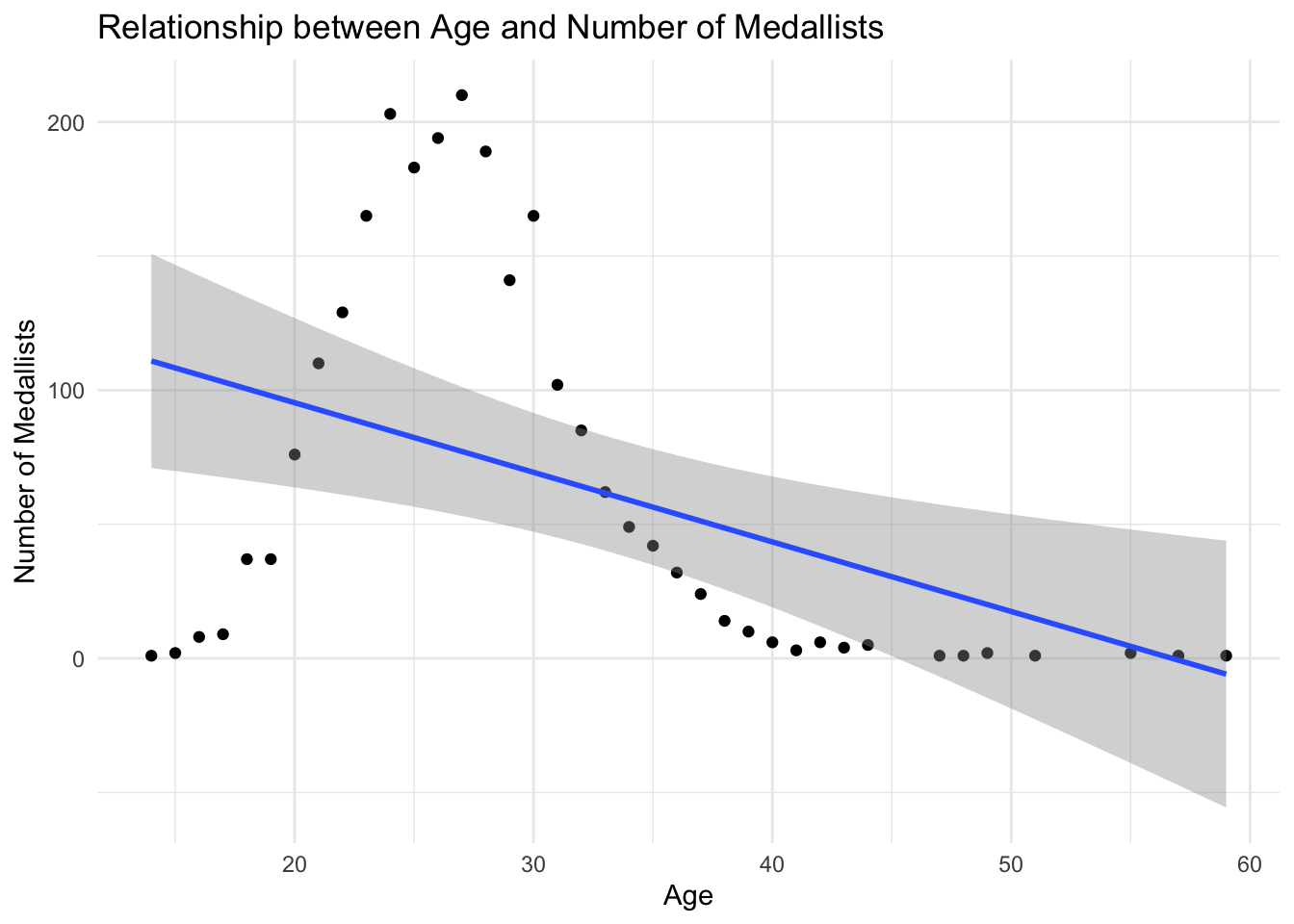
We will use a scatter plot to show the relationships between the number of medals and the age of the medallists.

df_clean |>
  mutate(age = 2024 - year(birth_date)) |>
  filter(is.na(age) == FALSE) |>
  group_by(age) |>
  summarise(medallist_count = n()) |>
1  ggplot(aes(x = age, y = medallist_count)) +
2  geom_point() +
3  geom_smooth(method = "lm") +
  labs(title = "Relationship between Age and Number of Medallists",
       x = "Age",
       y = "Number of Medallists") +
  theme_minimal()
1
Use aes() to specify the x and y variables.
2
Use geom_point() to create a scatter plot.
3
Use geom_smooth(method = "lm") to add a linear regression line to the plot.
`geom_smooth()` using formula = 'y ~ x'

World map

Use a world map to show the distribution of medallists in Paris 2024.

Here we will use two packages: rnaturalearth and rnaturalearthdata to get the world map data. The rnaturalearth package provides access to the Natural Earth dataset, which contains a variety of geospatial data, including country boundaries. The rnaturalearthdata package contains the data files needed to create maps using the rnaturalearth package.

library(rnaturalearth)
library(rnaturalearthdata)
1
Use ne_countries() to get the world map data. The scale parameter specifies the level of detail for the map, and the returnclass parameter specifies the class of the returned object (in this case, a simple features object).

Attaching package: 'rnaturalearthdata'
The following object is masked from 'package:rnaturalearth':

    countries110
1world <- ne_countries(scale = "medium", returnclass = "sf")
df_clean |>
  group_by(country_code) |>
  summarise(medallist_count = n()) |>
1  left_join(world, by = c("country_code" = "iso_a3")) |>
2  ggplot() +
3  geom_sf(aes(fill = medallist_count, geometry = geometry)) +
4  scale_fill_viridis_c(option = "B", direction = -1, begin = 0.3, end = 0.8) +
  labs(title = "Distribution of Medallists in Paris 2024") +
  theme_bw() +
  theme(
    panel.grid.major = element_blank(),  # Remove major grid lines
    panel.grid.minor = element_blank(),  # Remove minor grid lines
    axis.text = element_blank(),         # Remove axis text
    axis.title = element_blank(),        # Remove axis titles
    axis.ticks = element_blank(),        # Remove axis ticks
    panel.border = element_blank(),      # Remove panel border if desired
    plot.background = element_rect(fill = "white", colour = NA),  # Set plot background color
    legend.position = "bottom",          # Adjust legend position
    plot.title = element_text(hjust = 0.5)  # Center the plot title
  )
1
Use left_join() to join the world data with the df_clean data based on the country_code and iso_a3 columns. iso_a3 is the ISO 3166-1 alpha-3 country code, such as “USA” for the United States.
2
Use ggplot() to create a plot.
3
Use geom_sf() to create a map. The fill aesthetic is set to medallist_count to color the map based on the number of medallists in each country. The geometry aesthetic specifies the geometry column in the world data, which means the map will be drawn based on the country boundaries.
4
Use scale_fill_viridis_c() to set the color scale for the map. The option parameter specifies the color palette, direction specifies the direction of the color gradient, and begin and end specify the color range.

Note

geom_sf is a function in the ggplot2 package used to visualize simple features (spatial data) in R. It is specifically designed to handle geospatial objects, such as polygons, points, and lines that represent geographic data. The “sf” stands for simple features, a standard way to encode spatial vector data.